.png)
Kafy for small businesses
Business reports and analytics for Saudi small companies
Review sales, expenses, dues, and team activity in Kafy. Use the dashboard and reports to guide your small business’s regular performance review.
A clearer workflow for your team
A business review is harder when sales, spending, and delivery are reviewed separately. Kafy brings reporting into the platform where your daily records live.
- Review revenue, expenses, dues, and team activity on the dashboard.
- Use financial reporting and sales reporting together.
- Follow overdue invoices and delayed projects in your daily review.
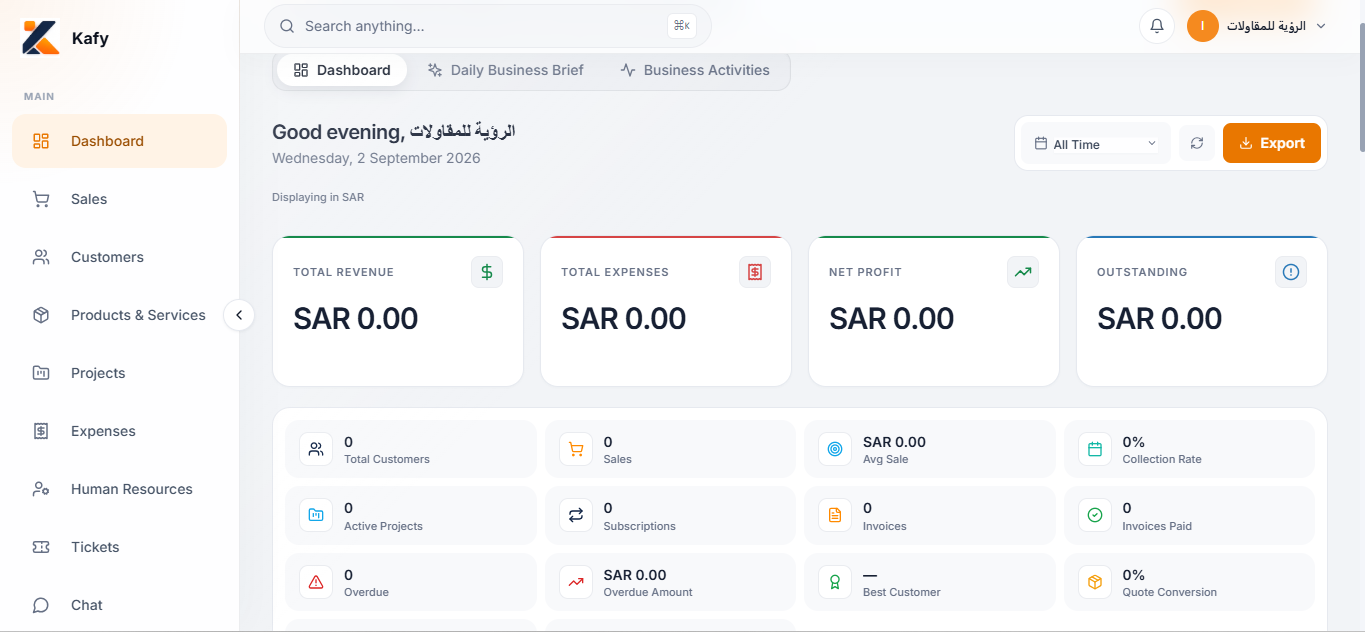
An example workflow
At the start of the week, an owner can review sales and expenses, check outstanding invoices, and look at delayed projects. Follow the records behind each number before assigning the next actions.
Frequently asked questions
What does the business dashboard show?
The existing Kafy dashboard describes revenue, expenses, dues, and team activity, with financial and sales reporting in one view.
How can I evaluate reports during the trial?
Enter representative business records, compare reports with those records, and ask our team about any specific reporting requirements before choosing your subscription.
Related features
Sales & invoicing
Manage quotations, invoices, and sales in Kafy alongside customers and products. Explore Saudi e-invoicing and try Kafy free for 30 days.
Projects & tasks
Plan projects, assign tasks, and follow deadlines in Kafy. Keep Saudi small-business teams aligned with customers, sales, and team chat.
Expenses
Track business expenses in Kafy alongside sales and reports. Bring income and spending into your daily business review with a 30-day free trial.
Choose the workflow that fits your business
Explore the tools with representative business records during your 30-day trial. Compare plans, review e-invoicing details, and contact us to confirm your requirements before subscribing.